


❄️ Chigo AC Remote Control – Replacement for Chigo & Success AC Control
Lost your remote or it’s no longer working? This one is compatible with many split models used across Pakistan, from these 2 brands. Whether you have a 1-ton or 1.5-ton unit, this remote gives you full control with a clean layout, responsive buttons, and a clear LCD screen.
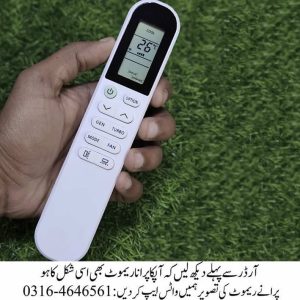
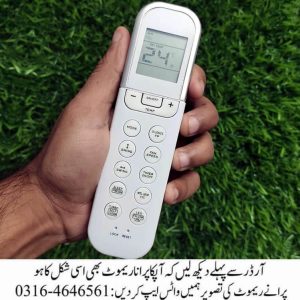
Please Note That: Before ordering, please match the shape and buttons orientation of your old remote with the product image. If it looks different, don’t worry – send us a picture and we’ll help confirm compatibility, In-Sha-Allah.
📋 Functions & Button Guide
| Button | Function |
|---|---|
| AUTO | Automatically selects mode based on room temperature. |
| COOL | Activates cooling mode for hot weather. |
| DRY | Removes humidity without overcooling. |
| HEAT | Turns on heating mode for winter use. |
| FAN | Runs fan only, without cooling or heating. |
| MODE | Switches between COOL, HEAT, DRY, FAN, and AUTO. |
| TEMP ▲ / ▼ | Adjusts temperature up or down. |
| FAN SPEED | Controls airflow speed – low, medium, high, or auto. |
| SWING | Moves air vents for better air distribution. |
| SLEEP | Maintains comfort while saving energy during sleep. |
| TIMER ON/OFF | Sets automatic ON/OFF times. |
| TURBO | Boosts cooling or heating for quick results. |
| CLEAN | Starts internal cleaning to reduce dust and bacteria. |
| LAMP | Turns screen backlight on/off. |
| TEMP | Displays current room temperature. |
| HOLD | Locks settings to avoid accidental changes. |
🌐 Order Online – Delivery Across Pakistan ✅ Compatible with many Success & Chigo AC models ✅ Works with inverter and non-inverter units ✅ Durable build with easy-to-press buttons ✅ Clear LCD screen for visibility ✅ Fast delivery available nationwide
🛠️ Remote Not Working? Try This First
- Replace AAA batteries
- Check LCD screen for power
- Test infrared signal using your phone’s camera
- If still not working, your AC receiver may need a reset
❓ FAQs – Using Your Remote
Q: How to set cooling mode? A: Press MODE until “COOL” appears, then adjust temperature.
Q: How to unlock the remote? A: Press and hold HOLD for 3–5 seconds.
Q: How to reset settings? A: Remove batteries for 30 seconds, then reinsert.
Q: Can I order online? A: Yes, delivery available across Pakistan.
🤝 Need Help Confirming Compatibility? Send a picture of your old remote on WhatsApp and we’ll guide you In-Sha-Allah.
📱 WhatsApp Support: 0316-4646561
🚚 Nationwide Delivery: Karachi, Lahore, Islamabad, Faisalabad, Multan, Peshawar, Quetta, and more.


Reviews
There are no reviews yet.